Electron 常见问题 (FAQ)
为什么我在安装 Electron 的时候遇到了问题?
在运行 npm install electron 时,有些用户会偶尔遇到安装问题。
在大多数情况下,这些错误都是由网络问题导致,而不是因为 electron npm 包的问题。 如 ELIFECYCLE、EAI_AGAIN、ECONNRESET 和 ETIMEDOUT 等错误都是此类网络问题的标志。 最佳的解决方法是尝试切换网络,或是稍后再尝试安装。
如果通过 npm 安装失败,您可以尝试直接从 electron/electron/releases 直接下载 Electron。
Electron 会在什么时候升级到最新版本的 Chrome?
通常来说,在稳定版的 Chrome 发布后一到两周内,我们会更新 Electron 内的 Chrome 版本。 这个只是个估计且不能保证,取决于与升级所涉及的工作量。
我们只使用稳定的 Chrome 频道。 如果一个重要的修复在 beta 或 dev 通道中,我们将返回端口。
For more information, please see the security introduction.
Electron 会在什么时候升级到最新版本的 Node.js?
我们通常会在最新版的 Node.js 发布后一个月左右将 Electron 更新到这个版本的 Node.js。 我们通过这种方式来避免新版本的 Node.js 带来的 bug(这种 bug 太常见了)。
Node.js 的新特性通常是由新版本的 V8 带来的。由于 Electron 使用的是 Chrome 浏览器中附带的 V8 引擎,所以 Electron 内往往已经有了部分新版本 Node.js 才有的崭新特性。
如何在两个网页间共享数据?
在两个网页(渲染进程)间共享数据最简单的方法是使用浏览器中已经实现的 HTML5 API。 比较好的方式是使用Storage API,localStorage,sessionStorage或者IndexedDB
或者,您可以使用 Electron 提供的原始版 IPC 。 To share data between the main and renderer processes, you can use the ipcMain and ipcRenderer modules. To communicate directly between web pages, you can send a MessagePort from one to the other, possibly via the main process using ipcRenderer.postMessage(). 通过消息端口进行的后续通信是直连的,不会绕过主进程。
几分钟后我应用的 Tray 消失了。
当用来存储 Tray 的变量被垃圾回收时,就会发生这种情况。
你可以参考以下两篇文章来了解为什么会遇到这个问题:
如果你只是要一个快速的修复方案,你可以用下面的方式改变变量的作用域,防止这个变量被垃圾回收。
const { app, Tray } = require('electron')
app.whenReady().then(() => {
  const tray = new Tray('/path/to/icon.png')
  tray.setTitle('hello world')
})
改为
const { app, Tray } = require('electron')
let tray = null
app.whenReady().then(() => {
  tray = new Tray('/path/to/icon.png')
  tray.setTitle('hello world')
})
我在 Electron 中无法使用 jQuery、RequireJS、Meteor、AngularJS。
因为 Electron 在运行环境中引入了 Node.js,所以在 DOM 中有一些额外的变量,比如 module、exports 和 require。 这导致 了许多库不能正常运行,因为它们也需要将同名的变量加入运行环境中。
我们可以通过禁用 Node.js 来解决这个问题,在Electron里用如下的方式:
// 在主进程中.
const { BrowserWindow } = require('electron')
const win = new BrowserWindow({
  webPreferences: {
    nodeIntegration: false
  }
})
win.show()
假如你依然需要使用 Node.js 和 Electron 提供的 API,你需要在引入那些库之前将这些变量重命名,比如:
<head>
<script>
window.nodeRequire = require;
delete window.require;
delete window.exports;
delete window.module;
</script>
<script type="text/javascript" src="jquery.js"></script>
</head>
require('electron').xxx 未定义。
在使用 Electron 的提供的模块时,你可能会遇到和以下类似的错误:
> require('electron').webFrame.setZoomFactor(1.0)
Uncaught TypeError: Cannot read property 'setZoomLevel' of undefined
很可能是你在过程中使用了错误的模块。 比如,electron.app 只能在主进程中使用, 然而 electron.webFrame 只能在渲染进程中使用。
文字看起来很模糊,这是什么原因造成的?怎么解决这个问题呢?
如果 sub-pixel anti-aliasing已被禁用,那么 LCD 屏幕上的字体可能会看起来模糊。 示例:
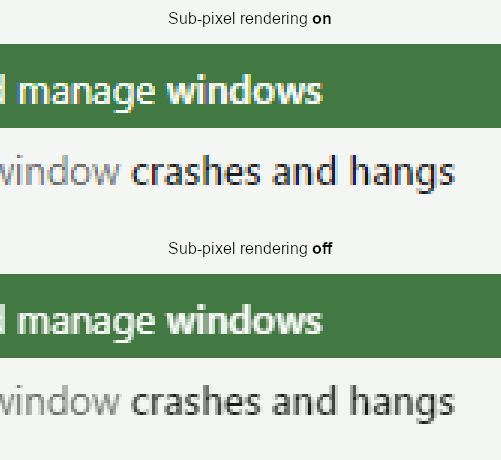
子像素反锯齿需要一个包含字体光图的图层的非透明背景。 (详情请参阅这个问题)
To achieve this goal, set the background in the constructor for BrowserWindow:
const { BrowserWindow } = require('electron')
const win = new BrowserWindow({
  backgroundColor: '#fff'
})
效果仅可见于(一些) LCD 屏幕。 即使您没有看到差别,您的一些用户可能会看到。 最好始终以这种方式确定背景,除非你有理由不这样做。
注意到,仅设置 CSS 背景并不具有预期的效果。